 A few months ago, I asked Google to join the group of people that have access to Google Mashup Editor. As soon as Google granted my access to the private beta, I played around a bit with the tool. Altough its possibilities are endless, I had no good idea for a mashup that I would want. Since I'm happy owner of an Ipod Touch, I started to think about a customized version of this blog especially for the Ipod Touch/Iphone. After some playing around, I was quickly able to make a simple gadget, that takes the atom feed of his blog and strips everything but the essential. To access the gadget, surf to http://castfortwo.googlemashups.com. To add the Google gadget to your personalized homepage, go to your homepage, click on "Add items", select "Add a feed or gadget" and enter the address of the gadget : http://castfortwo.googlemashups.com/gadget.xml. The gadget should now appear on your homepage:
This how it looks on the Ipod Touch mobile version of iGoogle:
Monday, January 21, 2008
Cast42 as gadget via Google Mashup Editor

Monday, January 14, 2008
What I hope to hear in Steve Jobs keynote
 Rumours are running wild in anticipation of the keynote presentation of Steve Jobs tomorow. I hope that:
- Will Wright takes stage to announce that Spore will be released for mac first. His showing up supports the claim from Steve that OSX takes gaming serious. I can brag for to months to my PC collegues about how good Spore is (isn't that priceless ;-))
- A basic version for .Mac becomes free and is powered and fully interoperable with Google services. More iDisk space can be bought from Google or Amazon S3.
- Iphone comes to Belgium.
- Apple clarifies their bidding strategy together with Google on the 700 MHz spectrum. This is why 'something is in the air'.
- OSX Leopard is updated with a functional ZFS filesystem from SUN. ZFS has already been open sourced for osx but is in beta.
- Timemachine can be used over Wifi. Currently, backup synchronisation goes only over the USB or Ethernet wire. I hope to be able to connect a USB disk to the Apple Basestation Extreme and connect my macbook pro via Wifi.
- Itunes Europe launches with rental movies from major studios.
- OSX on AppleTV becomes open. We can prototype or own channel on it.
- Google Maps becomes integrated in Ipod Touch.
Sunday, January 13, 2008
iGoogle on Ipod Touch
Recently, Google homepage iGoogle got an Iphone/Ipod Touch specific overhaul. It can be reached on http://www.google.com/ig/i. This is how it looks on my Ipod Touch:

Sunday, December 30, 2007
SIP VoIP iPodTouch instructions
In this video, an application on an Ipod Touch makes a phone call with a SIP phone.
Sunday, December 23, 2007
Utility application to check disk utilisation on osx
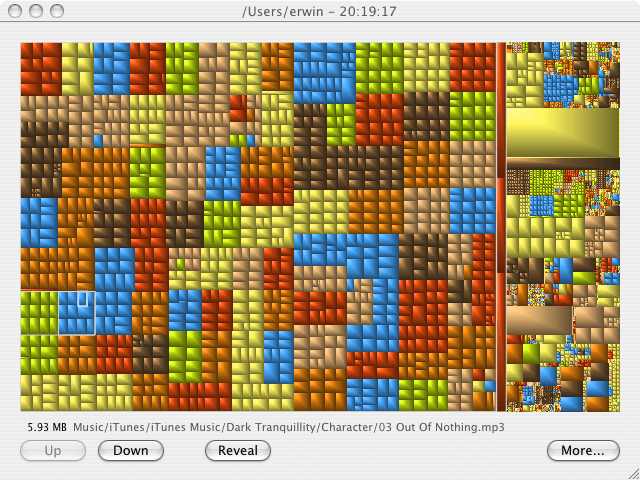
As my harddisk of my macbook was getting full, I needed something to select what files I wanted to remove. Following the classical 80/20 rule, a small number of files take a lot of place. The trouble is to find them. On pc, I used SequoiaView. Luckily, programs that generate tree maps also exist for the mac. First, I tried Disk Inventory X, a GPL program. It generates the treemaps, but does it very slowly. I looked a bit further and found GrandPerspective (also free software). That tool performed like I was used from SequoiaView.
Thursday, December 20, 2007
Updated Analytics script ga.js works with Google blogger
Google provided an updated script to call the new javascript ga.js to enable to track usage of html pages with Google Analytics.
<script type="text/javascript">
var gaJsHost = (("https:" == document.location.protocol) ? "https://
ssl." : "http://www.");
document.write(unescape("%3Cscript src='" + gaJsHost + "google-
analytics.com/ga.js' type='text/javascript'%3E%3C/script%3E"));
</script>
<script type="text/javascript">
var pageTracker = _gat._getTracker("UA-xxxx-xx");
pageTracker._initData();
pageTracker._trackPageview();
</script>
I injected above code in to the template of this blog and everyting is now working fine. If you want to try it, Andy wrote an how to.

Sunday, December 16, 2007
New Google homepage in Ipod Touch in Belgium
just surf to http://www.google.com/m
In a previous post "No new Google homepage for Ipod Touch in Belgium yet" I remarked that when entering the URL http://www.google.com in mobile Safari, the browser is redirected to the classic Google homepage with the URL http://www.google.be/m. So Ipod Touch users in Belgium can not try the new integrated that Google announced. However, if you type in http://www.google.com/m in Belgium on the Iphone or Ipod Touch you reach the new Google interface on the Ipod/Itouch.
Friday, December 14, 2007
New Analytics script not accepted by Blogger
Google asks to update the Google Analytics script to:
    <script type=”text/javascript”>
    var gaJsHost = (("https:" == document.location.protocol) ? " https://ssl." : "http://www.");
    document.write("\<script src='" + gaJsHost + " google-analytics.com/ga.js' type='text/javascript'>\<\/script>" );

    var pageTracker = _gat._getTracker(“UA-xxxxxx-x”);
    pageTracker._initData();
    pageTracker._trackVisit();
    </script>
When entering this in to the Blogger HTML template, I get an error:
Open quote is expected for attribute "{1}" associated with an element type "type".
If you don't need the secure http access, you can simplify the script to:
<script src='http://www.google-analytics.com/ga.js' type='text/javascript'>
</script>
<script type='text/javascript'>
var pageTracker = _gat._getTracker("UA-xxxxxxx-x"); pageTracker._initData(); pageTracker._trackPageview(); </script>
Please only use the above code if you urgently want to test the new script. It might be wise to wait until the Google engineers have ironed out this issue if you do not want to put your huge analytics income at risk ;-)
Thursday, December 06, 2007
No new Google homepage for Ipod Touch in Belgium yet
Google announced a new Google home page for the Iphone. Here are screenshots how the new homepage looks on the Iphone. However, if you surf to http://www.google.com in Belgium on a Ipod Touch, you still get the classical homepage:

It looks that because the Apple Iphone is still not available in Belgium, Ipod touch owners have to wait. I know that Wifi is far from ubiquitous in Belgium, so large pratical value is not to be expected. Still I'm eager how the new Google homepage is experienced. I already value a lot the Gmail, Google Reader and Google Calendar are refitted for the Ipod Touch.
Tuesday, November 20, 2007
First Itunes movie not in Itunes Belgium Store
Today Itunes exclusively launches its first feature film called Purple Violet. This could be significant because new business models that cut out elements in the chain often shake up the industry. Unfortunatly, the movie Purple Violet is only available in the US store:
The Itunes store does speak Dutch but a Belgium store is not there yet. To make matters worse, I still have to select Itunes Belgique :
I hope Itunes België will become available soon. If they wait to long it might be that we need an Itunes Vlaanderen ;-) .
Sunday, November 18, 2007
Web pages especially for Iphone/Ipod Touch
I was wondering how the embed a media file into HTML for the mobile Safari browser on Apple's Iphone or Ipod Touch. Therefore, I looked up how others are doing it and what's in the documentation Apple:
- BBC has made a portal to its podcasts : http://www.bbc.co.uk/radio
/podcasts/directory/ip/ or you can just go to bbc.co.uk/podcasts.
The code used to embed the mp3 podcasts is:
<embed width="100%" height="22" enablejavascript="true" controller="false" autostart="false" pluginspage="www.apple.com/quicktime/download" src="http://downloads.bbc.co.uk/podcasts/northernireland/nimusic/nimusic__20071112-2215.mp3"/>
More info on BBC podcast portal. - Also Apple makes their trailers available in an Ipod Touch / Iphone friendly way. The URL is http://www.apple.com/trailers/iphone/
Here's the HTML code that Apple uses to embed the Beowulf movie:
<embed src="http://movies.apple.com/trailers/iphone/images/greenband_320x133.png" href="http://movies.apple.com/movies/paramount/beowulf/beowulf-fte_i320.m4v"
target="myself" width="320" height="133"
controller="false"
autoplay="false"
scale="1" cache="true"        type="video/quicktime"        pluginspage="http://www.apple.com/quicktime/download/">
Ars Technica has some screenshots of Apple trailers on the Iphone. - The code proposed by Apple looks like this:
<script src="AC_QuickTime.js" language="JavaScript" type="text/javascript"></script>
    QT_WriteOBJECT_XHTML('http://d2.mikseri.net/m/30a/30007249206/Frozen%20Silence%20-%20Cherish.mp3', '32', '16', '',
    'autoplay', 'false',
    'emb#bgcolor', 'black',
    'cache','false',
    'align', 'top');
The URL is to a piece of music of the album "Frozen Silence" by Matti Paalanen. - Also the indie site http://ourstage.com has Iphone specific pages according to Techcrunch. But when surfing to that page on my Ipod Touch i get no specific content.

To get those HTML codes, go to about:config in Firefox and set the value of general.useragent.extra.firefox from something like 'Firefox/2.0.0.9' to 'Useragent "Mozilla/5.0 (iPod; U; CPU like Mac OS X; en) AppleWebKit/420.1 (KHTML,like Gecko) Version/3.0 Mobile/3A100a Safari/419.3' and then surf to the URL for ipod touch or iphone and inspect the page source.
Tuesday, November 13, 2007
Impression of Google's Android UI on Ipod Touch
I downloaded Engadget visual tour of Android's UI in Iphoto, cutted out the screens and synced them on my Ipod Touch. Voila, a visual impression of Google Android UI on Apple Ipod Touch:


Ipod Touch Firmware 1.1.2 also in ITunes Belgium
Already a few days announced, the new firmware for Apple's Iphone and Ipod Touch is available trough Itunes. Also in Itunes België :
The main new feature is that you can edit the calendar and the contacts with the Ipod Touch. The new update is a whopping 157 megabyte big, so it took 10 minutes to download via my DSL line. Installation went smooth. I'm reconsidering installing Spanning Sync
to synchronize my Google Calendar and Gmail contacts with Apple's Ical and contactbook. Spanning sync is free for the first 15 days.
Friday, November 09, 2007
Double rainbow
 Just saw a nice full rainbow that was partly doubled trough the window at the office. Picture taken with a Sony Ericsson K810i mobile phone.
Thursday, November 08, 2007
Barcamp Brussels #4 decided
Peter Forret has decided on the organisation of Barcamp Brussels. Barcamp #4 will be on the 1st of december 2007 near Brussels North railway station (at mVillage).
I have subscribed already.
Monday, October 29, 2007
Streaming video with EyeTV 2.5 to an Ipod Touch
EyeTV Version 2.5 from Elgato Systems allows to stream a recording to an Ipod Touch or Iphone. I found no good documentation or howto after a few searches on Google. Therefore, I documented the process for your further reference. I tested this on an Ipod Touch but assume it's similar for the Apple Iphone. I also assume the mac with the Eyetv software and the ipod touch/iphone are on the same wireless network.
First, open the EyeTV Preferences panel and select Wi-Fi Access : and click on start. The following question comes up:
 Don't click "Prepare All" because it will transcode all your recordings to H2.64 and that will take a while. (Depending on the number and the lengths of the recodings you have. You can start it later when you've verified your set-up works and pleases you). After pressing "Don't prepare", you get the following window:
 The addres where your Ipod Touch/Iphone has to connect to is, in this particular case, http://192.168.2.4:2170/eyetv/
In your case, the URL can be different. Take the URL to left of the "Send Email" button in the EyeTV Preferences window under the "Wi-Fi Access" tab. You can immediately enter that address into the browser to verify the EyeTV streaming server is up and running.
Next, go to "Show EyeTV Programs" in the Window menu of the EyeTV program. Select a short recording (or make one for a test) and select the recording. The recoding turns into blue. In the action menu (the one with the gear icon) select "Prepare for Wi-Fi Access Again" : After a while, the recording is transcoded to H.264 and stored for streaming to the Ipod Touch. This can take as long the time of the recording or longer depending on the speed of your system.
Next, take your Ipod Touch, start Safari and surf to http://192.168.2.4:2170/eyetv/ : Tap on the recording you want to stream and, after a short period, a thumbnail with a start button in lower right corner appears (a small triangle inside a cirkel). Tap the start button.
 And the recording is streaming to your Ipod Touch/Iphone:
 After a while, the movie controller automatically disappears.
 The recording can be streamed from your mac to the Ipod Touch while your mac is showing live TV.
Spore comes to Nintendo Wii
I've just read an interview with Will Wright. He announces some marvelous news: his new game "Spore" will also be released on the Nintendo Wii in the second quater of 2008. Just to wet your saliva go and look to Spore on EA's 360° panofantastic display.
Also "Lego Star Wars" is coming to the Wii end of 2007. The online mode is reserved for Xbox 360 and PS3 only. And Guitar Hero 3 for Wii and ... I'm gone write that nice letter to Santa Claus soon!!!

Thursday, October 25, 2007


Saturday, October 06, 2007
Convert muxed MPEG-1 to MOV or MPEG-4
A lot of Sony digital picture camera's also capture video. Some store the captured video files into muxed MPEG-1 files and have extension .MPG. To check if your Sony camera does this, proceed as follows. Open up the "Window" menu in Quicktime and select "Show Filminfo". It reports the structure of the file as "MPEG1 Muxed, 640x480 pixels" (other sizes are possible). Those files can be played back by Quicktime but when exporting to another videoformat or saving as mov, the audio does not come along. Importing such files into Imovie '08 or Final Cut Pro 2 also do not work propely. (Read iMovie does not work with muxed MPEG-1 and MPEG-2 clips about that and written by Apple).
To get rid of those pesky muxed mpeg-1 files, I now describe a procedure that does not need recoding of the captured original file. Instead, it allows to losslessly transforms the muxed mpeg-1 file into a Quicktime mov file without any convertion loss nor lengthy encodings. You only need one freeware tool that you can download from Apple's side.
To get rid of the muxed MPEG-1 files you need MPEG Streamclip. (MPEG Streamclip for windows). I tested this with a movie file captured by a Sony Cybershot DSC-W1. First, I started MPEG Streamclip:
Next, I dragged the MPEG movie movXXXXX.mpg to the application (XXXXX is the number of your movie, in the test case it is mov01249.mpg):
Then, select from the File menu, "Demux to M2V and AIFF":
Specify where the two new files must be saved and click Save.
Now, double click on the new movXXXXX.m2v file to open up Quicktime Pro. If you now export the movie or save as mov, the audio will be in it. This is because if movXXXXX.aiff is in the same directory as where movXXXXX.m2v is stored, Quicktime Pro will automatically load the video with extension .m2v and the audio file with extension .aiff together. (as explained by Heny Kautz). You can now save as a movXXXXX.mov file for editing or export to another format (for exmple MPEG-4). This is the resulting file in MPEG-4 format mov01249.mp4. You can download that file, play it with Quicktime and try to import it into Imovie '08 or Final Cut Pro 2. It should work. Succes.
Wednesday, October 03, 2007
Make mp4 files faststart with MP4box
The beta Flash player 9 , allows for playback of mp4 files containing AVC video and AAC audio. The example worked but the entire file was first downloaded before playback started. This is because the so called moov atom, is not in front of the file. To fix this on Mac OSX, I first downloaded MP4box (for OSX/PPC). Then, I issued the command: mp4box -inter 500 test.mp4 and uploaded the test.mp4 file. Now, the demo is faststart!
To make sure, I made no errors, I made a second example that is indeed not fast start. The I issued the mp4box command:
The resulting file benefiet_inter.mp4 is included in a third demo that is fast start: Third Test of mp4 in Flash version 9
This is the info you get from mp4box -info:
l02958:~/Desktop ln$ ../../../Applications/MP4Box -info  benefiet_inter.mp4
* Movie Info *
       Timescale 600 - Duration 00:03:35.006
       Fragmented File no - 2 track(s)
       File Brand mp42 - version 1
       Created: GMT Wed Oct  3 17:55:44 2007

File has no MPEG4 IOD/OD

Track # 1 Info - TrackID 1 - TimeScale 600 - Duration 00:03:34.920
Media Info: Language "English" - Type "vide" - Sub Type "avc1" - 5373 samples
MPEG-4 Config: Visual Stream - ObjectTypeIndication 0x21
AVC/H264 Video - Visual Size 384 x 224 - Profile Main @ Level 1.3
NAL Unit length bits: 32
Self-synchronized

Track # 2 Info - TrackID 2 - TimeScale 32000 - Duration 00:03:35.008
Media Info: Language "English" - Type "soun" - Sub Type "mp4a" - 6719 samples
MPEG-4 Config: Audio Stream - ObjectTypeIndication 0x40
MPEG-4 Audio AAC LC - 1 Channel(s) - SampleRate 32000
Synchronized on stream 1
It would be nice that somehow I could figure out where the moov atom is with mp4box. But that's for another post.

 Posts
Posts


