Cast for two

Showing posts with label howto. Show all posts

Monday, February 01, 2010

How to deal with search crawlers for your mobile site

So you've setup your mobile site (for example hosted at http://m.yoursite.com) derived from a desktop version (for example hosted at http://www.yoursite.com).Typically, you're using a Content Management System and by providing adapted templates for your mobile items, you can provide a mobile version of your site. The question is now how to deal with robots that crawl the web to build a search index. The danger exists that the robots detect duplicate content because the mobile version from a content item might contain the same text and pictures but wrapped on another template. I think the following steps should be taken:


  1. Only allow the mobile web crawlers with the following robot.txt in the root of the mobile site (for example http://m.yoursite.com) by allowing bots with user agent "Googlebot-Mobile" or "YahooSeeker/M1A1-R2D2" and to disallow all others:

    User-agent: Googlebot-Mobile
    Disallow:

    User-agent: YahooSeeker/M1A1-R2D2
    Disallow:

    User-agent: *
    Disallow: /

    Also, disallow mobile crawlers to your desktop version of your site by adding the following robot.txt in the root of your site (for example http://www.yoursite.com/robot.txt ):

    User-agent: Googlebot-Mobile
    Disallow: /

    User-agent: YahooSeeker/M1A1-R2D2
    Disallow: /

    User-agent: *
    Disallow:

    With the first robot.txt in the mobile root and the second one (here above) in the root of your desktop site, your mobile site items should only appear when people search with a mobile search engine (for example by using http://m.google.com ) but not when searching with the desktop version (for example http://www.google.com ).

    As far as I know, the MSNbot that crawls for the Microsoft Bing index together does not have a bot version that crawls strickly for the mobile Bing search engine at http://m.bing.com.

  2. Add your mobile site to Google : http://www.google.com/support/webmasters/bin/answer.py?answer=40348 , Bing http://www.bing.com/webmaster/SubmitSitePage.aspx, Yahoo (http://siteexplorer.search.yahoo.com/mobilesubmit) and other relevant mobile indexes

  3. Create a mobile sitesmap : http://www.google.com/support/webmasters/bin/answer.py?answer=34648&cbid=-1rt6r3us7wrvl&src=cb&lev=answer


Let me know I've you have anything to add to this strategy in the comments.

Sunday, February 15, 2009

Sync Nokia 6124 Classic contacts with Google Sync via SyncML


I own a Nokia 6124 Classic since a few months. It's the entry model employees get from my employer. Since I work on mac, I could not sync the contacts because there is no free Isync plugin available yet. Recently, Google Sync was announced. It worked very good to sync my contactc on my Iphone with my Google contacts. I use Google Contact as my main database. Hence, I begun to wonder if I could sync my Nokia using Google Sync. Based upon the instructions from Google for another type of Nokia phone, I was able to derive a working setup. Here are the instructions:

  1. From the main menu, go to the "Settings" folder and select "Connectivity".
  2. From the Sync screen, select "Options"->"New sync profile" and enter the following:
  3. Sync profile name: Google Sync
  4. Select "Applications" then "Contacts"
  5. Include in sync: Yes
  6. Remote database: contacts
  7. Synchronisation type: Both Ways
  8. Select "Back" then "Back" then "Connection settings"
  9. Server version: 1.2
  10. Server ID: Google
  11. Data bearer: Internet
  12. Access point: Always ask
  13. Host address: https://m.google.com/syncml
  14. Port: 80
  15. Username: username@gmail.com (fill in your own username)
  16. Password: the password of your Google Account
  17. Allow sync requests: Yes
  18. Accept all sync requests: No
  19. Network authentication: No
  20. Select "Back", "Back" and then "Exit" to save the settings
  21. You have now finished the setup
To perform the sync operation, take the following steps:
  1. From the main Settings menu, select "Connectivity".
  2. From the Connectivity menu, select "Sync"'
  3. Highlight your Google Sync Profile.
  4. Select "Options" and click "Synchronise".
  5. Select your access point: Px Live (depends on your configuration)
  6. That's it. Your 6124 Classic will now connect and sync its phonebook with your Google Contacts. The contacts on your phone will appear in your google contacts and all your Google contact are stored into your phone. If you don't want this, change the value for the synchronization type set in step 7 of the setup
The synchronisation goes via Internet over the air (OTA). The next I would like to find out if i could pair the phone to my mac via Bluetooth and use the internet connection of my mac to do the synchronisation. I don't now if that possible. On the other hand, the synchronisation of my 800 contacts or so only took a few minutes, so I don't know its worth the hassle.

Thursday, June 12, 2008

How to make popcorn with a GSM ?

On youtube,

four people phone to four GSM phones that lie around some corn seeds. As a result of the GSM's going off, the seeds turn into popping popcorn. Peter Van De Veire, a popular radiomaker in Flanders Belgium, conducted the same experiment : Popcorn maken met een gsm | StuBru
but corns stayed corns. Did the radiostation stubru something wrong or are the youtube movies spoofs ? I think they are but I'm not sure. The question is relevant because lot of people will takes those popping popcorns as proof the GSM harm our body. And that conclusion is entirely unscientific.

Sunday, December 23, 2007

Utility application to check disk utilisation on osx


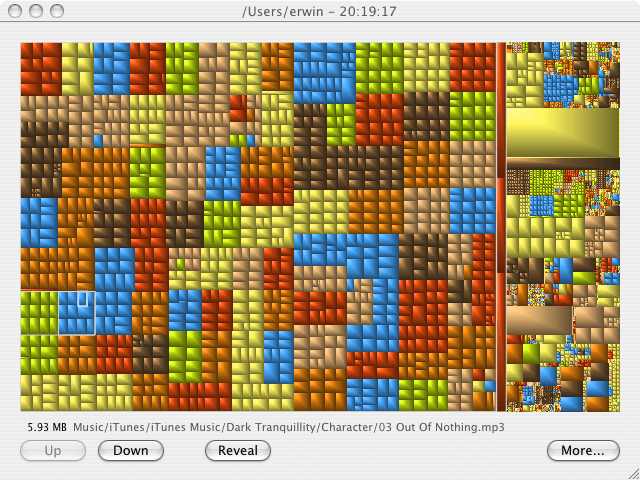
As my harddisk of my macbook was getting full, I needed something to select what files I wanted to remove. Following the classical 80/20 rule, a small number of files take a lot of place. The trouble is to find them. On pc, I used SequoiaView. Luckily, programs that generate tree maps also exist for the mac. First, I tried Disk Inventory X, a GPL program. It generates the treemaps, but does it very slowly. I looked a bit further and found GrandPerspective (also free software). That tool performed like I was used from SequoiaView.

Sunday, November 18, 2007

Web pages especially for Iphone/Ipod Touch

I was wondering how the embed a media file into HTML for the mobile Safari browser on Apple's Iphone or Ipod Touch. Therefore, I looked up how others are doing it and what's in the documentation Apple:

  1. BBC has made a portal to its podcasts : http://www.bbc.co.uk/radio/podcasts/directory/ip/ or you can just go to bbc.co.uk/podcasts.

    The code used to embed the mp3 podcasts is:

    <embed width="100%" height="22" enablejavascript="true" controller="false" autostart="false" pluginspage="www.apple.com/quicktime/download" src="http://downloads.bbc.co.uk/podcasts/northernireland/nimusic/nimusic__20071112-2215.mp3"/>

    More info on BBC podcast portal.

  2. Also Apple makes their trailers available in an Ipod Touch / Iphone friendly way. The URL is http://www.apple.com/trailers/iphone/
    Here's the HTML code that Apple uses to embed the Beowulf movie:

    <embed src="http://movies.apple.com/trailers/iphone/images/greenband_320x133.png" href="http://movies.apple.com/movies/paramount/beowulf/beowulf-fte_i320.m4v"
    target="myself" width="320" height="133"
    controller="false"
    autoplay="false"
    scale="1" cache="true" type="video/quicktime" pluginspage="http://www.apple.com/quicktime/download/">

    Ars Technica has some screenshots of Apple trailers on the Iphone.
  3. The code proposed by Apple looks like this:

    <script src="AC_QuickTime.js" language="JavaScript" type="text/javascript"></script>
    QT_WriteOBJECT_XHTML('http://d2.mikseri.net/m/30a/30007249206/Frozen%20Silence%20-%20Cherish.mp3', '32', '16', '',
    'autoplay', 'false',
    'emb#bgcolor', 'black',
    'cache','false',
    'align', 'top');

    The URL is to a piece of music of the album "Frozen Silence" by Matti Paalanen.

  4. Also the indie site http://ourstage.com has Iphone specific pages according to Techcrunch. But when surfing to that page on my Ipod Touch i get no specific content.


To get those HTML codes, go to about:config in Firefox and set the value of general.useragent.extra.firefox from something like 'Firefox/2.0.0.9' to 'Useragent "Mozilla/5.0 (iPod; U; CPU like Mac OS X; en) AppleWebKit/420.1 (KHTML,like Gecko) Version/3.0 Mobile/3A100a Safari/419.3' and then surf to the URL for ipod touch or iphone and inspect the page source.

Monday, October 29, 2007

Streaming video with EyeTV 2.5 to an Ipod Touch

EyeTV Version 2.5 from Elgato Systems allows to stream a recording to an Ipod Touch or Iphone.
I found no good documentation or howto after a few searches on Google. Therefore, I documented the process for your further reference. I tested this on an Ipod Touch but assume it's similar for the Apple Iphone. I also assume the mac with the Eyetv software and the ipod touch/iphone are on the same wireless network.

First, open the EyeTV Preferences panel and select Wi-Fi Access :
and click on start. The following question comes up:
Don't click "Prepare All" because it will transcode all your recordings to H2.64 and that will take a while. (Depending on the number and the lengths of the recodings you have. You can start it later when you've verified your set-up works and pleases you). After pressing "Don't prepare", you get the following window:
The addres where your Ipod Touch/Iphone has to connect to is, in this particular case, http://192.168.2.4:2170/eyetv/
In your case, the URL can be different. Take the URL to left of the "Send Email" button in the EyeTV Preferences window under the "Wi-Fi Access" tab. You can immediately enter that address into the browser to verify the EyeTV streaming server is up and running.

Next, go to "Show EyeTV Programs" in the Window menu of the EyeTV program. Select a short recording (or make one for a test) and select the recording. The recoding turns into blue. In the action menu (the one with the gear icon) select "Prepare for Wi-Fi Access Again" :
After a while, the recording is transcoded to H.264 and stored for streaming to the Ipod Touch. This can take as long the time of the recording or longer depending on the speed of your system.

Next, take your Ipod Touch, start Safari and surf to http://192.168.2.4:2170/eyetv/ :
Tap on the recording you want to stream and, after a short period, a thumbnail with a start button in lower right corner appears (a small triangle inside a cirkel). Tap the start button.
And the recording is streaming to your Ipod Touch/Iphone:
After a while, the movie controller automatically disappears.
The recording can be streamed from your mac to the Ipod Touch while your mac is showing live TV.

Saturday, October 06, 2007

Convert muxed MPEG-1 to MOV or MPEG-4

A lot of Sony digital picture camera's also capture video. Some store the captured video files into muxed MPEG-1 files and have extension .MPG. To check if your Sony camera does this, proceed as follows. Open up the "Window" menu in Quicktime and select "Show Filminfo". It reports the structure of the file as "MPEG1 Muxed, 640x480 pixels" (other sizes are possible). Those files can be played back by Quicktime but when exporting to another videoformat or saving as mov, the audio does not come along. Importing such files into Imovie '08 or Final Cut Pro 2 also do not work propely. (Read iMovie does not work with muxed MPEG-1 and MPEG-2 clips about that and written by Apple).

To get rid of those pesky muxed mpeg-1 files, I now describe a procedure that does not need recoding of the captured original file. Instead, it allows to losslessly transforms the muxed mpeg-1 file into a Quicktime mov file without any convertion loss nor lengthy encodings. You only need one freeware tool that you can download from Apple's side.

To get rid of the muxed MPEG-1 files you need MPEG Streamclip. (MPEG Streamclip for windows). I tested this with a movie file captured by a Sony Cybershot DSC-W1. First, I started MPEG Streamclip:

Next, I dragged the MPEG movie movXXXXX.mpg to the application (XXXXX is the number of your movie, in the test case it is mov01249.mpg):

Then, select from the File menu, "Demux to M2V and AIFF":

Specify where the two new files must be saved and click Save.
Now, double click on the new movXXXXX.m2v file to open up Quicktime Pro. If you now export the movie or save as mov, the audio will be in it. This is because if movXXXXX.aiff is in the same directory as where movXXXXX.m2v is stored, Quicktime Pro will automatically load the video with extension .m2v and the audio file with extension .aiff together. (as explained by Heny Kautz). You can now save as a movXXXXX.mov file for editing or export to another format (for exmple MPEG-4). This is the resulting file in MPEG-4 format mov01249.mp4. You can download that file, play it with Quicktime and try to import it into Imovie '08 or Final Cut Pro 2. It should work. Succes.

Friday, August 31, 2007

Embedding MP4 in HTML with Flash 9 beta Moviestar

From Jeroen Wijering I found a way to play MP4 movies in a webpage using the new Flash Version 9 beta, nicknamed Moviestar. It uses SWFObject to embed a Flash file using Javascript and the mediaplayer by Jeroen.
This is the code:


<script type="text/javascript" src="swfobject.js"></script>


<p id="player1">

<a href="http://www.macromedia.com/go/getflashplayer">

Get the Flash Player</a> to see this player.

</p>


<script type="text/javascript">

var s1 = new SWFObject("mediaplayer.swf","single","384","224","7");

s1.addParam("allowfullscreen","true");

s1.addVariable("file","test.mp4");

s1.addVariable("image","preview.jpg");

s1.addVariable("overstretch","none");

s1.addVariable("smoothing","false");

s1.write("player1");

</script>

In the same directory above code is residing, store swfobject.js,test.mp4,preview.jpg and mediaplayer.swf.
The result looks like this:

I don't understand yet when clicking on fullscreen, the video does not resize but that's probably an option of mediaplayer I have to enable. Also, I have the impression the movie is first downloaded before playback starts. I am quite sure the header atoms in test.mp4 are in front of the file. So the movie should faststart. Here is an example where it does work. Any suggestions welcome in the comment.

UPDATE:
leaving out the overstrech variable so that is get the default true value, stretches the movie to fullscreen in fullscreen mode. No problem now with the fast start. So the code becomes:

<script type="text/javascript" src="swfobject.js"></script>


<p id="player1">

<a href="http://www.macromedia.com/go/getflashplayer">

Get the Flash Player</a> to see this player.

</p>


<script type="text/javascript">

var s1 = new SWFObject("mediaplayer.swf","single","384","224","7");

s1.addParam("allowfullscreen","true");

s1.addVariable("file","test.mp4");

s1.addVariable("image","preview.jpg");

s1.write("player1");

</script>

Saturday, August 25, 2007

New feature in Google Maps: embed into html

Google announced a new feature of Google Maps. Go to "My Maps"/"Mijn kaarten" on maps.google.be and click on "Link to this page"/"Link naar deze pagina". Two textfields appear:
Embedding the HTML in the second text box under "HTML in website plakken":


<iframe width="425" height="350"
frameborder="no" scrolling="no" marginheight="0" marginwidth="0"

src="http://maps.google.be/maps/ms?ie=UTF8&hl=nl&msa=0&

msid=106593127569810234189.000435c68e072f63d1f57&om=1&

ll=50.916561,4.699123&spn=0.090651,0.05137&

output=embed&s=AARTsJpF3cBYZmrDjYcLS8foVeBIWCBK5A">
</iframe><br/>
<a href="http://maps.google.be/maps/ms?ie=UTF8&hl=nl&msa=0&

msid=106593127569810234189.000435c68e072f63d1f57&

om=1&ll=50.916561,4.699123&spn=0.090651,0.05137&

source=embed"

style="color:#0000FF; text-align:left;font-size:small">
Grotere kaart weergeven

</a>

renders in this blogpost as:

Grotere kaart weergeven
which will show up right on your blog but might leave just a blank spot in your feed reader. Let me know in the comments how it works with your feed reader.
If you click on "Ingesloten kaart aanpassen en voorbeeld ervan weergeven", you get the ability to alter the defaults of the generated HTML:

Basically, it allows to alter the size of the included map. It's a pitty that you can not influence the controls that appear on the map.

Sunday, July 29, 2007

How to include a HTML page into blogger posts ? (final)

I already undertook three attemps (attempt 1, attempt 2 and attempt 3) to include a Google Sheet into a blogger post without much succes. I almost surrendered but I got a new idea. I started from the proposal I found in "Insert HTML page into another HTML page" that basically proposed the following code:

<!--[if IE]>
   <object classid="clsid:25336920-03F9-11CF-8FD0-00AA00686F13" data="some.html">
      <p>backup content</p>
   </object>
<![endif]-->
<!--[if !IE]> <-->
   <object type="text/html" data="some.html">
      <p>backup content</p>
   </object>
<!--> <![endif]-->

The above code is very good for direct inclusion into a HTML page, but Blogger filters out the conditionals for selecting the code based upon the user agent. So it's not the solution we're seeking for. But then I got another idea. Maybe I could insert the above code using Javascript that IS allowed to be inserted in Bloggers HTML. In that way, it's possible to circumvent the restriction in Blogger HTML. I pasted the code into a HTMl-to-Javascript convertor. This gave me:

<script language="JavaScript" type="text/javascript">
<!--
function writeJS(){
var url = 'http://spreadsheets.google.com/pub?key=pzcvT0aLrnhuxklkh_C8AVA&output=html&gid=0&single=true&widget=true';

var str='';
str+='<!--[if IE]>';
str+='<object classid="clsid:25336920-03F9-11CF-8FD0-00AA00686F13" data="'+url+'">';
str+='<p>backup content<\/p>';
str+='<\/object>';
str+='<![endif]-->';
str+=' <!--[if !IE]> <-->';
str+='<object type="text\/html" data="'+url+'">';
str+='<p>backup content<\/p>';
str+='<\/object>';
str+='<!--> <![endif]-->';
document.write(str);
}
writeJS();
//-->
</script>


that renders as:

Above code reders nicely in Firefox and Safari but not in Interet Explorer 6.
Therefore I changed the code such that in IE an iframe is displayed and otherwise an object. The code was put into javascript:

<script language="javaScript" type="text/javascript"    src="http://lode.nachtergaele.googlepages.com/includeHTML3.js">
</script>


and on IE6 it renders to:


So finally, we start to view some light:


  1. First, include into blogger a Javascript:

    <script language="JavaScript" src="http://lode.nachtergaele.googlepages.com/includeHTML3.js" type="text/javascript" ></script>

  2. Put in the Javascript file the following Javascript code:

    <!--
    function writeJS(){
    var str='';
    str+='<!--[if IE]>';
    str+=' <iframe src="http://spreadsheets.google.com/pub?key=pzcvT0aLrnhuxklkh_C8AVA&output=html&gid=0&single=true&widget=true" width='550' height='370' frameborder='0'>';
    str+='<p>backup content</p>';
    str+='</iframe>';
    str+='<![endif]-->';
    str+='<!--[if !IE]> <-->';
    str+=' <object type="text/html" data="http://spreadsheets.google.com/pub?key=pzcvT0aLrnhuxklkh_C8AVA&output=html&gid=0&single=true&widget=true" width='550' height='370' frameborder='0'>';
    str+=' <p>backup content</p>';
    str+=' </object>';
    str+='<!--> <![endif]-->';
    document.write(str);
    }
    writeJS();
    //-->
  3. Alternatively, Javascript can detect the user agent as well. This leads to the following code:

    <!--
    function writeJS(){
    var str='';
    if (navigator.appName.indexOf("Microsoft") != -1) {
       str+=" <iframe       src='http://spreadsheets.google.com/pub?key=pzcvT0aLrnhuxklkh_C8AVA&output=html&gid=0&single=true&widget=true'       width='550' height='370' frameborder='0'>";
       str+='<p>backup content</p>';
       str+='</iframe>';
    } else {
       str+=" <object type='text/html'       data='http://spreadsheets.google.com/pub?key=pzcvT0aLrnhuxklkh_C8AVA&output=html&gid=0&single=true&widget=true'       width='550' height='370' frameborder='0'>";
       str+=' <p>backup content</p>';
       str+=' </object>';
    }
    document.write(str);
    }
    writeJS();
    //-->

  4. And that wil do the trick. The Javascript code generates HTML code that includes an Iframe if viewed by Internet Explorer and an object for other browsers. I agree that this is maybe a big detour just to able to include an object. And hopefully it shows up in the feed readers....


In 50 ways to include HTML into a Blogger post an overview is given of all kinds of techniques and can be used for testing.

How to (not?) include a HTML page into blogger posts ? (continued 2)

Much to my despair, I noticed the Google Spreadsheet included in a blog post of this blog does not render nicely (even after some digging into the issue, see post1 and post2) in Microsoft Internet Explorer 6 and 7:
While reading Make Magazine in Google Reader, I noticed that the Youtube movie of post "Thomas Edsison hates cats" was coming trough nicely. I looked up the HTML code in the RSS feed and adapted the code I found for displaying inline HTML code. It boils down to something like this:

<![CDATA[<p>
<object data="URL to HTML page" type="text/html" width="520" height="350">
<embed src="URL to HTML page" type="text/html" width="520" height="350"></embed>
</object></p>
<p>Title of HTML Page <a href="URL to HTML page">Link</a></p>]]>

Unfortunatly, Blogger does not accept the <![CDATA[. It reports "tag is broken". I removed the CDATA:

<p>
<object data="URL to HTML page" type="text/html" width="520" height="350">
<embed src="URL to HTML page" type="text/html" width="520" height="350"></embed>
</object></p>
<p>Title of HTML Page <a href="URL to HTML page">Link</a></p>


which renders to (with URL of the Google Spreadsheet):


Blog of colleagues Juli 2007 Link


which renders on Microsoft Internet Exporer 6 as:

Bummer. The object does not display nicely. Ok, lets see what Google Reader makes from it:

Archhh. This is even worse. It must have been the CDATA. Why is Blogger not accepting that I put CDATA into a blogpost. Give me full control of the HTML in the feed please !
Or maybe, as a last resort conflicting with my open standards first DNA, I could try this (as a kind of revance ;-)): export the Google Sheet to Microsoft Excel and include the Excel sheet with MIME type : application/vnd.ms-excel
The code would be like this:

<p>
<object data="URL to HTML page" type="application/vnd.ms-excel" width="520" height="350">
<embed src="URL to HTML page" type="application/vnd.ms-excel" width="520" height="350"></embed>
</object></p>
<p>Title of HTML Page <a href="URL to HTML page">Link</a></p>

which causes Firefox 2.0.5 on OSX to pop up this dialogue:

Ok, I surrender. Maybe the Iframe code Google Sheets proposes it not that bad at all. If any body has a better idea, please let me know.

Friday, July 27, 2007

How to include a HTML page into blogger posts ? (continued)

In How to include a HTML page into blogger posts ? I explored using the more general object tag to include an external page of HTML into a blogger post. You would for example want to do this when discussing a published Google Document Sheet. When checking the appearence of the post in the RSS reader Google Reader, I noticed that the alternate text showed up:

This brought me to an idea for an improvement. I took a screenshot of the Google Sheet as displayed in my browser and loaded up the picture to the blog post. Next I moved the blurb of code for the picture:

<a onblur="try {parent.deselectBloggerImageGracefully();}catch(e) {}" href="https://blogger.googleusercontent.com/img/b/R29vZ2xl/AVvXsEis6fFWgw_EHUdXJ9ez9cL69nHhZWKtx-fGWF_glB7NmFob_7n_2G5KcUPFtB8iBBv1v30grM3GWevFiTlQo7jTnNgS1YUm2upPmP14c6fq3WHpLm8BSwIRsFl5fEZhR_BBqSGXpw/s1600-h/Screenshot_5.png">
<img style="display:block; margin:0px auto 10px;
text-align:center;cursor:pointer; cursor:hand;"
src="https://blogger.googleusercontent.com/img/b/R29vZ2xl/AVvXsEis6fFWgw_EHUdXJ9ez9cL69nHhZWKtx-fGWF_glB7NmFob_7n_2G5KcUPFtB8iBBv1v30grM3GWevFiTlQo7jTnNgS1YUm2upPmP14c6fq3WHpLm8BSwIRsFl5fEZhR_BBqSGXpw/s400/Screenshot_5.png"
border="0" alt=""id="BLOGGER_PHOTO_ID_5091774679559246658" /></a>

into to object tag enclosure:

<object data="URL to HTML page" type="text/html" width="520" height="350">

<a onblur="try {parent.deselectBloggerImageGracefully();}
catch(e) {}" href="https://blogger.googleusercontent.com/img/b/R29vZ2xl/AVvXsEis6fFWgw_EHUdXJ9ez9cL69nHhZWKtx-fGWF_glB7NmFob_7n_2G5KcUPFtB8iBBv1v30grM3GWevFiTlQo7jTnNgS1YUm2upPmP14c6fq3WHpLm8BSwIRsFl5fEZhR_BBqSGXpw/s1600-h/Screenshot_5.png">
<img style="display:block; margin:0px auto 10px;
text-align:center;cursor:pointer; cursor:hand;"
src="https://blogger.googleusercontent.com/img/b/R29vZ2xl/AVvXsEis6fFWgw_EHUdXJ9ez9cL69nHhZWKtx-fGWF_glB7NmFob_7n_2G5KcUPFtB8iBBv1v30grM3GWevFiTlQo7jTnNgS1YUm2upPmP14c6fq3WHpLm8BSwIRsFl5fEZhR_BBqSGXpw/s400/Screenshot_5.png"
border="0" alt=""id="BLOGGER_PHOTO_ID_5091774679559246658" /></a>

</object>

The result is that in Google Reader a picure of the Google sheet shows up:

If you want that the browser is directed to the published HTML page of the Google Sheet when clicking on the picture of the sheet, you can change the URL of the href of the pciture:

<object data="URL to HTML page" type="text/html" width="520" height="350">

<a onblur="try {parent.deselectBloggerImageGracefully();}
catch(e) {}" href="URL to HTML page">
<img style="display:block; margin:0px auto 10px;
text-align:center;cursor:pointer; cursor:hand;"
src="https://blogger.googleusercontent.com/img/b/R29vZ2xl/AVvXsEis6fFWgw_EHUdXJ9ez9cL69nHhZWKtx-fGWF_glB7NmFob_7n_2G5KcUPFtB8iBBv1v30grM3GWevFiTlQo7jTnNgS1YUm2upPmP14c6fq3WHpLm8BSwIRsFl5fEZhR_BBqSGXpw/s400/Screenshot_5.png"
border="0" alt=""id="BLOGGER_PHOTO_ID_5091774679559246658" /></a>

</object>


Of cource, you can also copy and past the HTML code directly into the blog post. Then you get this:
URLEst. ValuePage RankWebsite GraderTechnorati AuthorityTechnorati Rank

http://peterdecroubele.be205945237167,118

http://www.koenfillet.be$1910477--

http://www.werner.be94944928226,753

http://koenfillet.blogspot.com/44547756103,461

http://www.braincubes.be/23421241,367,488

http://castfortwo.blogspot.com/823668779,588

http://www.patdonnez.be/log/index.php80313--

http://detender.wordpress.com/5046310638,771

http://joro.wordpress.com/4224122,505,981

http://217.19.231.156/apps/blog_david/40259--

http://mertenswouter.com/blog/11050--

http://stielo.blogspot.com/206213,900,217

http://hetruimesop.blogspot.com/0043-7,931,033

http://jeroenvanaert.blogspot.com/0043-7,931,033

http://myjumps.blogspot.com/0042-7,931,033


which is not that bad. Only something with the first row went wrong.
A bit fiddling with the HTML code allows to obtain this:

URLEst. ValuePage RankWebsite GraderTechnorati AuthorityTechnorati Rank
http://peterdecroubele.be205945237167,118
http://www.koenfillet.be$1910477--
http://www.werner.be94944928226,753
http://koenfillet.blogspot.com/44547756103,461
http://www.braincubes.be/23421241,367,488
http://castfortwo.blogspot.com/823668779,588
http://www.patdonnez.be/log/index.php80313--
http://detender.wordpress.com/5046310638,771
http://joro.wordpress.com/4224122,505,981
http://217.19.231.156/apps/blog_david/40259--
http://mertenswouter.com/blog/11050 - -
http://stielo.blogspot.com/206213,900,217
http://hetruimesop.blogspot.com/0043-7,931,033
http://jeroenvanaert.blogspot.com/0043-7,931,033
http://myjumps.blogspot.com/0042-7,931,033


Every table row contained a bogus
<td class="rAll"> </td>
that I just deleted.

Thursday, July 26, 2007

How to include a HTML page into blogger posts ?

In the previous post, I included HTML code generated from a published Google Sheet. To do so, I first used the code proposed when publishing a Google Document and selecting Blogger as target.

This is basically the HTML code Google proposes to post into the HTML code of post on Blogger:


<iframe src="URL to HTML page" frameborder="0" height="350" width="520">
</iframe>

This works when viewing the blog post in a browser, but when reading the post with a feed reader, the HTML iframe is sometimes ommitted. Recently, I read an interesting article "The object tag - embed content in valid strict HTML -" arguing for the use of the HTML object tag as follows:

<object data="URL to HTML page" type="text/html" width="520" height="350">
alt : <a href="URL to HTML page">alternate text</a>
</object>

The advantage of using the object tag is that the HTML object (the Googele sheet) appears when reading the blog post inline with netvibes:

In Google Reader, the alternate text appears (in this case the URL to the HTML of the document):

In iGoogle, it is even worse. There even the alternate text does not appear:

The above picture displays the Atom feed from Google (http://castfortwo.blogspot.com/feeds/posts/default) and the feed from feedburner (http://feeds.feedburner.com/cast42).

Conclusion is that even using the object tag is no ideal solution to include an exteral HTML page into a blog post. But if you opt to do it, the use of the object tag may be preferred instead of using an Iframe. In case you would know a better solution, do not hesitate to add a comment.